 Elsewhere
Elsewhere is your computer, from anywhere.
Control your Mac from another Mac or from your iPhone. Fast, smooth streaming. Sign in and connect in seconds.
- Free for 7 days
- Cancel anytime
- Mac, iPhone, and iPad


Fast
Fast enough to forget it's remote.
Elsewhere connects your devices to each other directly and uses the video hardware built into your computer, so nothing slows the picture down. Typing, scrolling, and dragging windows feel like sitting in front of the machine.
- at up to 1440p
- 60 fps
- to connect
- 1 s

iPhone and iPad
Your computer, in your pocket.
Open the app, tap your computer, and you're there. Use your finger as a trackpad or tap directly on what you see. Tap a modifier key and it holds for the next key, so ⌘-Shift-4 works the way you expect.
- Trackpad and Touch pointer modes
- Sticky ⌘ ⌥ ⌃ ⇧, Escape, Tab, and arrow keys above the keyboard
- Everywhere Clipboard: copy and paste both ways, photos and files included
- Stays on screen in a floating window when you switch apps
- Choose the display when there is more than one
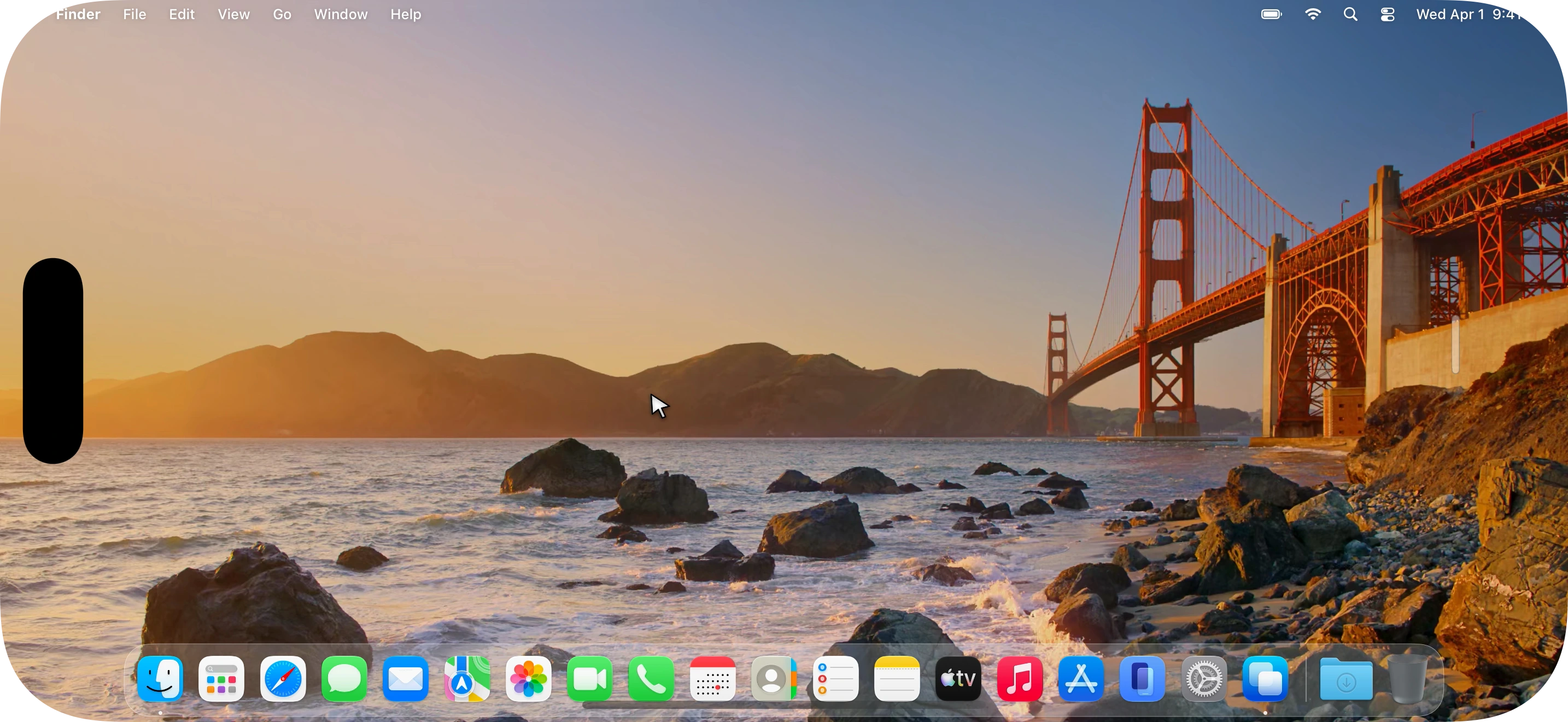
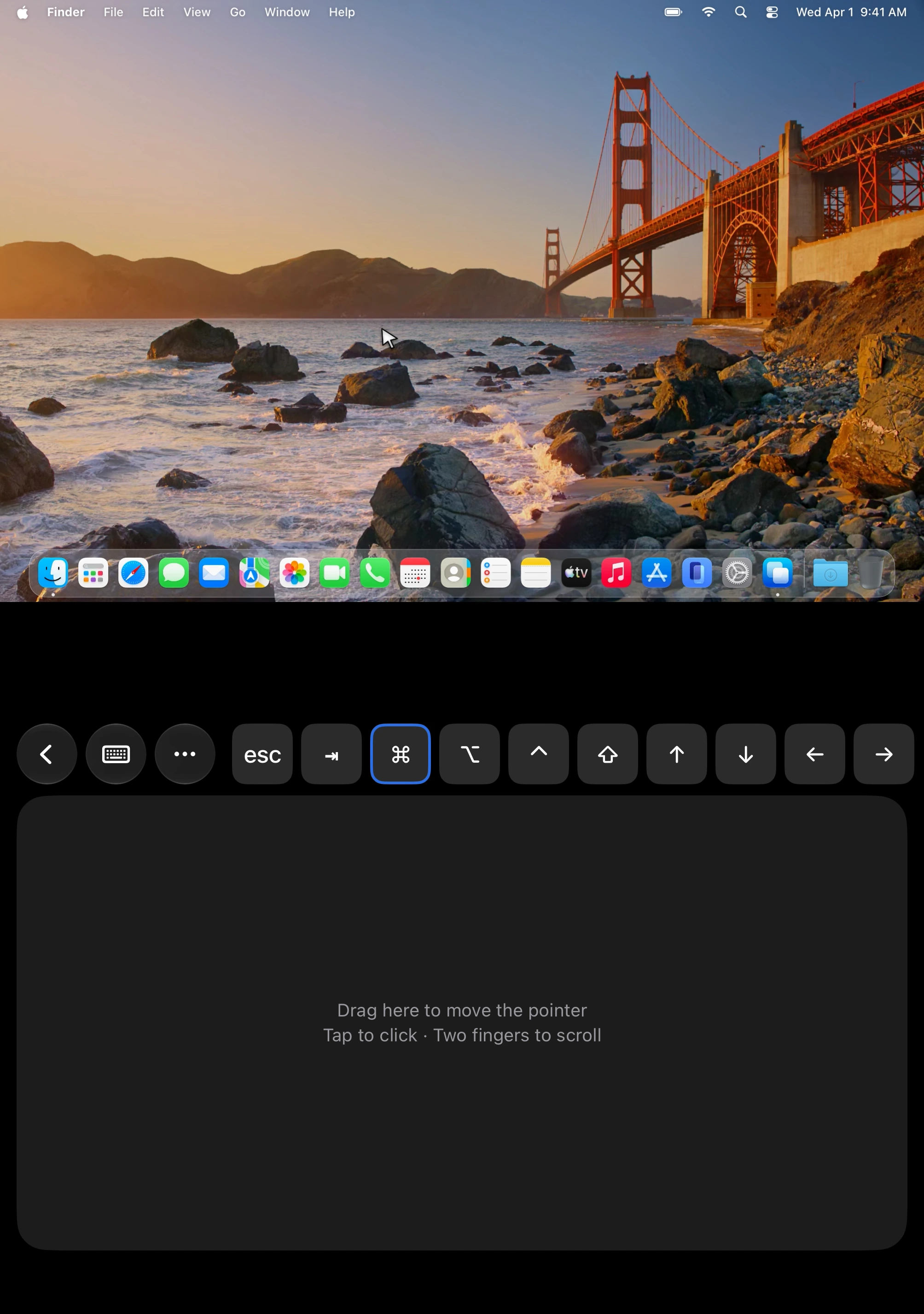
iPhone Duo
Fold it into a laptop.
Open iPhone Duo partway and set it down. Your computer's screen fills the top half. A trackpad and the keys you need sit below the fold.
- The picture fills the screen above the fold
- A trackpad, Escape, Tab, arrows, and ⌘ ⌥ ⌃ ⇧ below it
- Open it flat and the session takes the whole inner screen
- Close it and the session comes with you
Made for
Wherever you are, your computer is right there.
At the café, on the desktop at home
Your desktop has the files, the apps, and the horsepower. Your laptop has a browser. Connect and work on the real thing, at full speed.
On the couch, from your iPhone
Check on a render, kick off a download, close the thing you left open. Your computer is one tap away, and it feels like you're sitting at it.
Helping a parent
They read you an ID and a passcode, click Accept, and you fix it while they watch. Nothing to install on your side beyond the app you already have.

Away for a week
Leave your Mac awake and logged in, and it answers whenever you call. It can lock the moment you leave. Waking it from sleep is coming.

Unattended access
Reachable, even when nobody's home.
Your own devices connect without anyone at the Mac to click Accept, because the other end is also you. Leave it awake and logged in, and it answers whenever you call.
- Opens at login, once you turn that on
- Every session is end-to-end encrypted between your own devices
- See who is connected right now, next to the clock
- Waking from sleep and the login window are coming
Security
Your screen is yours. Not ours, not anyone's.
Three promises. See each one acted out on the Security page.
Only your devices can see it
Encrypted on one of your devices, decrypted on the other. Nothing in between can read it, including us.
Connected directly
Our servers introduce your devices, then step aside. Your screen never passes through anything we own.
Nothing in the middle to break into
Keys are made on your devices and never leave them. No open ports, no password on a server.
The small things
Everything you'd expect, and the parts you'd miss.
Every display
Pick the one you want. Elsewhere matches the picture to the screen in your hand.
Everywhere Clipboard
Copy on one Mac, paste on another or on your iPhone. Pictures and files come too, not just text.
Shortcuts pass through
In full screen, ⌘-Tab and ⌘-Space go to the remote Mac, not the one in front of you.
Sound comes too
Hear the remote Mac where you are, or mute it.
Lock when you leave
Turn it on, and the Mac locks the moment you disconnect, so nobody walks past an open session.
Know who's connected
A dot next to the clock, and the menu shows who is on and for how long. Pause sharing in one click.
Quality on its own
Adapts to your network every second. Cap the frame rate or hide the wallpaper when the link is slow.
Trackpad or touch
On iPhone, drag a finger as a trackpad or tap straight on what you see. Switch whenever.
Every device
One account. Mac, iPhone, and iPad.
Install on the Macs you want to reach and the devices you'll reach them from. One subscription covers all of them. Windows is next.
Setup
Set up in seconds.
Install, sign in, and connect to your devices. No port forwarding, nothing to host.
Install on the computer you want to reach
Sign in and turn on sharing. That is the only setup there is.
Sign in on the device you're holding
Your computers appear in the list the moment you sign in, with live status.
Connect
Tap a computer. A direct, encrypted connection opens in about a second.
Questions
Before you download.
Is there a free trial?
Yes. 7 days, with every feature. We ask for a card so the plan can continue, and you can cancel any time before the first charge.
Can I reach my computer when it's asleep?
Not yet. Leave your Mac awake and logged in, and it answers whenever you connect. Waking it from sleep is coming.
Do I need to open ports or change my router?
No. Your devices find each other through your account and connect directly. There is nothing to configure.
Can anyone see my screen, including you?
No. Sessions are encrypted on one of your devices and decrypted on the other. Our servers only introduce the two, then step aside.
What does one subscription cover?
Every feature, and the Mac, iPhone, and iPad apps. Personal is $9.99 a month or $99.99 a year, for up to 5 computers. Pro is $19.99 a month or $199.99 a year, for any number. iPhones and iPads are always free to add. Windows will be included when it's out.
How do I cancel?
From the app or from your account page. You keep access until the end of the month or year you paid for.
Get started
Ready when you are.
Set up in seconds. Free for 7 days, then from $9.99 a month.